Fists of the Gadgets is a Yu-Gi-Oh! TCG special set released on 22 August 2019, in the VRAINS era. It has 60 cards.
This free checklist lets you tick off the cards you own, count spare copies for trading, see your progress by rarity and plan your binder pages. It works on phones and computers, even offline, and your collection stays on your device.
Card details and images come from YGOPRODeck, and prices from TCGplayer.
Most valuable Fists of the Gadgets cards
Brotherhood of the Fire Fist - ElephantFIGA-EN012 · Secret Rare£3.91$5.17
Brotherhood of the Fire Fist - PandaFIGA-EN013 · Secret Rare£3.64$4.81
Scrap RecyclerFIGA-EN051 · Super Rare£3.33$4.41
Brotherhood of the Fire Fist - EagleFIGA-EN016 · Secret Rare£2.74$3.63
The Hidden CityFIGA-EN049 · Super Rare£2.66$3.52
Fire Formation - TenkiFIGA-EN028 · Secret Rare£2.47$3.27
Ignis Heat, the True DracowarriorFIGA-EN053 · Secret Rare£1.42$1.88
Brotherhood of the Fire Fist - ElandFIGA-EN014 · Secret Rare£1.32$1.75
Amorphage SlothFIGA-EN056 · Super Rare£1.21$1.60
TCGplayer market prices, updated 15 Nov 2026. Pounds are converted from US dollars.
Fists of the Gadgets card list 60 cards
Main Set FIGA-EN001–FIGA-EN060
FIGA-EN001 Boot-Up Corporal - Command Dynamo Super Rare
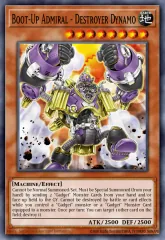
FIGA-EN002 Boot-Up Admiral - Destroyer Dynamo Secret Rare
FIGA-EN003 Boot-Up Order - Gear Charge Super Rare
FIGA-EN004 Boot-Up Order - Gear Force Secret Rare
FIGA-EN005 Powerhold the Moving Battery Super Rare
FIGA-EN006 Green Gadget Super Rare
FIGA-EN007 Red Gadget Super Rare
FIGA-EN008 Yellow Gadget Super Rare
FIGA-EN009 Gold Gadget Super Rare
FIGA-EN010 Silver Gadget Super Rare
FIGA-EN011 Brotherhood of the Fire Fist - Ram Secret Rare
FIGA-EN012 Brotherhood of the Fire Fist - Elephant Secret Rare
FIGA-EN013 Brotherhood of the Fire Fist - Panda Secret Rare
FIGA-EN014 Brotherhood of the Fire Fist - Eland Secret Rare
FIGA-EN015 Brotherhood of the Fire Fist - Swan Secret Rare
FIGA-EN016 Brotherhood of the Fire Fist - Eagle Secret Rare
FIGA-EN017 Brotherhood of the Fire Fist - Peacock Secret Rare
FIGA-EN018 Fire Fortress atop Liang Peak Secret Rare
FIGA-EN019 Fire Formation - Domei Secret Rare
FIGA-EN020 Fire Formation - Ingen Secret Rare
FIGA-EN021 Ultimate Fire Formation - Sinto Secret Rare
FIGA-EN022 Brotherhood of the Fire Fist - Gorilla Super Rare
FIGA-EN023 Brotherhood of the Fire Fist - Bear Super Rare
FIGA-EN024 Brotherhood of the Fire Fist - Spirit Super Rare
FIGA-EN025 Brotherhood of the Fire Fist - Rooster Super Rare
FIGA-EN026 Brotherhood of the Fire Fist - Cardinal Super Rare
FIGA-EN027 Brotherhood of the Fire Fist - Tiger King Super Rare
FIGA-EN028 Fire Formation - Tenki Secret Rare
FIGA-EN029 Fire Formation - Tensu Super Rare
FIGA-EN030 Fire Formation - Yoko Super Rare
FIGA-EN031 Archfiend's Awakening Secret Rare
FIGA-EN032 Archfiend's Call Secret Rare
FIGA-EN033 Archfiend's Ascent Secret Rare
FIGA-EN034 Archfiend's Manifestation Secret Rare
FIGA-EN035 Latency Super Rare
FIGA-EN036 Swap Cleric Super Rare
FIGA-EN037 Defcon Bird Super Rare
FIGA-EN038 Prohibit Snake Super Rare
FIGA-EN039 Code Radiator Secret Rare
FIGA-EN040 Spool Code Super Rare
FIGA-EN041 Cynet Optimization Super Rare
FIGA-EN042 Cynet Conflict Super Rare
FIGA-EN043 Code Talker Super Rare
FIGA-EN044 Shootingcode Talker Super Rare
FIGA-EN045 Elphase Super Rare
FIGA-EN046 Talkback Lancer Super Rare
FIGA-EN047 Rasterliger Super Rare
FIGA-EN048 Subterror Fiendess Super Rare
FIGA-EN049 The Hidden City Super Rare
FIGA-EN050 Subterror Final Battle Super Rare
FIGA-EN051 Scrap Recycler Super Rare
FIGA-EN052 Majesty Maiden, the True Dracocaster Super Rare
FIGA-EN053 Ignis Heat, the True Dracowarrior Secret Rare
FIGA-EN054 Dinomight Knight, the True Dracofighter Super Rare
FIGA-EN055 Amorphage Lechery Super Rare
FIGA-EN056 Amorphage Sloth Super Rare
FIGA-EN057 Amorphage Goliath Super Rare
FIGA-EN058 Chronograph Sorcerer Super Rare
FIGA-EN059 Mythical Beast Master Cerberus Super Rare
FIGA-EN060 Starving Venom Fusion Dragon Super Rare
Fists of the Gadgets FAQ
How many cards are in Fists of the Gadgets?
Fists of the Gadgets has 60 cards.
What rarities are in Fists of the Gadgets?
Counting each card once, without other rarities:
Super Rare 40
Secret Rare 20
When did Fists of the Gadgets come out?
Fists of the Gadgets was released on 22 August 2019.
Is this Fists of the Gadgets checklist free?
Yes. Binder Tracker is free, with no ads, no sign-up and no tracking. Your collection is saved on your own device and works offline, and Export or share moves it to another device as a link, code, QR code or file.